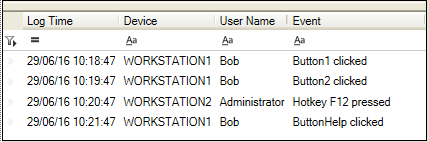
Available from Sym3 V6.2, you can use the event display control to display current and historical events in a grid. the Event Display grid allows the user to sort, group and filter the grid according to the filters.
Sym3 Client displays any events configured with the Event Display controls in the Event Display. The maximum number of events is set in the Sym3 web Alarm Server Configuration Settings page or in the Operator configuration Options page.
The Event Display control is read only with the events displayed newest first.
Open the destination window to add the display.
From the Toolbox, Select the Event display icon, move the pointer into the window and drag out the initial position and size for the control.
If the Property Editor is not displayed, click on Ribbon > Home > Property Editor
Click on the Event Display. The Properties for the control will appear in the Property Editor panel and allow changes to be made.
To adjust the default layout of the grid (columns, filter and grouping)
Name: Name of the control. Defaults to 'Event Display1'.
Alias: Alias of the control
Behaviour:
User Filtering: if ticked, the users will be able to modify the filters of each column
User Grouping: if ticked, the users will be able to modify the grouping of the grid.
Layout:
X: X location in the window to place the control
Y: Y location in the window to place the control
Width: Width of the control
Height: Height of the control
Anchor: Which edge of the window the control is anchored to when the window is resized. See Anchors.
Visual:
Visible: Defaults to visible. Untick if you wish this Control to be invisible.
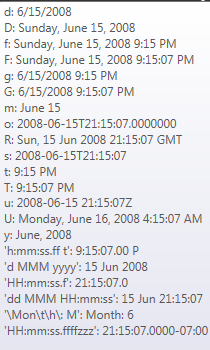
Date/Time format: format to use to display the date. Defaults to 'dd/MM/yy hh:mm:ss'.
Border:
Border Thickness: Default is 1. Border thickness in pixels.
Border Color: Select the color from the list of available colors defined in the project
Font:
Family: Font family defaults to 'Microsoft Sans Serif'. Select from one of the system available fonts.
Size: Default is 11. Font size in points.